NumpyArrayIterator vs. DirectoryIterator
Since Keras provides multiple options for the data type that can be fed into the Convolutional Neural Network (CNN), HARDy provides the user to leverage on two of these data types
- NumpyArrayIterator
- DirectoryIterator
Using the NumpyArrayIterator, the data files are imported, transformed and saved in the form of arrays as shown in the structure below. The data array comprising of data from all the data files is stored on disk in .pkl format inside the data path. The data array is then fed into the CNN as tf.keras.preprocessing.image.NumpyArrayIterator class. For more details on this class, please visit this tensorflow tutorial
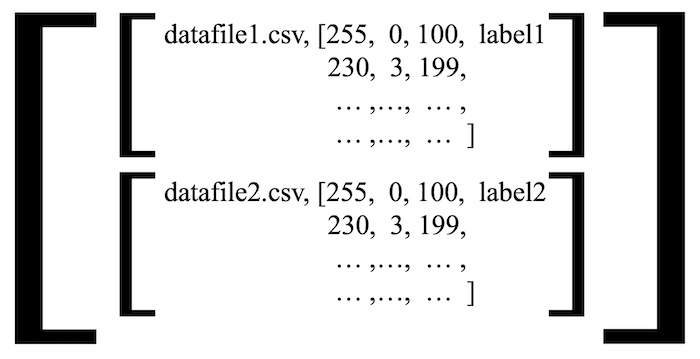
To use the NumpyArrayIterator, HARDy uses the iterator_mode argument in hardy_main function. If the value of iterator_mode is arrays, data_wrapper in HARDy create the data structure in the form of Numpy Array which would be treated by Keras as NumpyArrayIterator object. The example code is shown below:
run.hardy_main(raw_data_path, tform_config_path, classifier_config_path, batch_size=64,
scale=0.2, num_test_files_class=750, target_size=(100, 100), iterator_mode='arrays',
classifier='tuner', n_threads=1, classes=['class_1', 'class_2', 'class_3'],
project_name='my_project_name')
The DirectoryIterator works by importing, transforming and then saving the data in the form of ‘.png’ images on disk. The model explaining the workflow is shown below. The data is then fed into the CNN as tf.keras.preprocessing.image.DirectoryIterator. Further details on the DirectoryIterator are available on this tensorflow tutorial
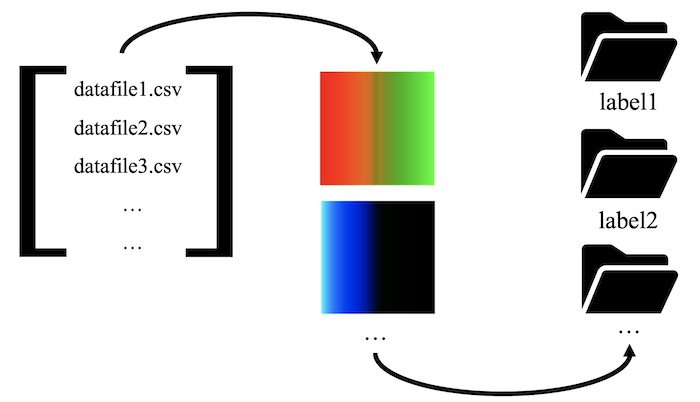
To utilize the DirectoryIterator, any other argument other than array for iterator_mode works. The usage is shown below:
run.hardy_main(raw_data_path, tform_config_path, classifier_config_path, batch_size=64,
scale=0.2, num_test_files_class=750, target_size=(100, 100), iterator_mode='images',
classifier='tuner', n_threads=1, classes=['class_1', 'class_2', 'class_3'],
project_name='my_project_name')